Club Schedule
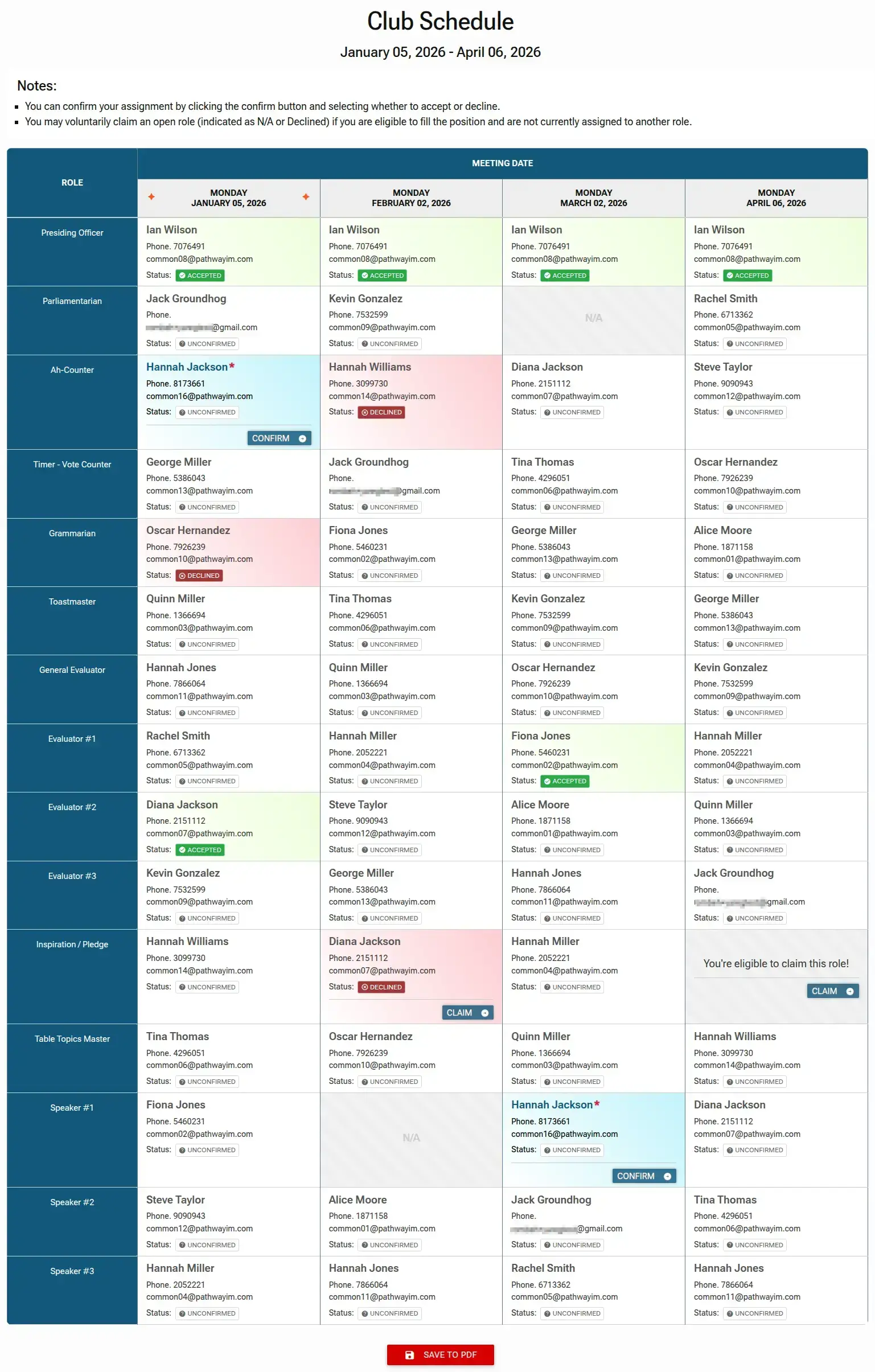
The Club Schedule page gives you a multi-week overview of upcoming meetings and assigned roles. From here, you can review and respond to your assigned roles (accept or decline), or claim available open roles you're eligible for. This grid helps you stay organized and engaged with club activities.
The Club Schedule Overview
- Meeting Dates: Meetings are organized in columns by date (e.g., Monday, January 05, 2026).
- Roles: Toastmaster role are listed in the first column.
- Status Indicators: Each assignment shows a color-coded status:
- Accepted (Green): The member has confirmed they will fill the role.
- Unconfirmed (Grey): The role is assigned, but the member has not yet responded.
- Declined (Red): The assigned member is unable to attend, leaving the role open.
- N/A: The role is currently vacant and available for any eligible member.
- Personal Highlighting: To help you easily locate your own assignments, roles assigned to you are highlighted with a light blue background and a red asterisk (
*) next to your name. - Offline Access: Use the
SAVE TO PDFbutton at the bottom of the page to download or print the current schedule.