Using The Mailer Tool
TMClubSchedule features the Bulk Mailer tool, an efficient communication solution for reaching your entire club membership at once. Allows you to send targeted, personalized email messages to specific groups of club members. This is ideal for sending announcements, reminders, or other important updates directly from within the platform. While the system handles routine alerts (like role reminders and schedule updates) automatically, the Bulk Mailer gives leadership a direct line to the club for everything else.
The Bulk Mailer Tool
This feature is designed to be accessible to the people who need it most at the exact time they need it:
- Club Administrators: Have permanent access via the Admin Dashboard to send club-wide announcements, newsletters, or policy updates.
- Toastmaster of the Week: For the duration of their assignment, the designated Toastmaster can access this tool from their Member Dashboard to coordinate specific meeting details with the team.
You can reach this page by navigating to the left-hand sidebar and clicking on Bulk Mailer.
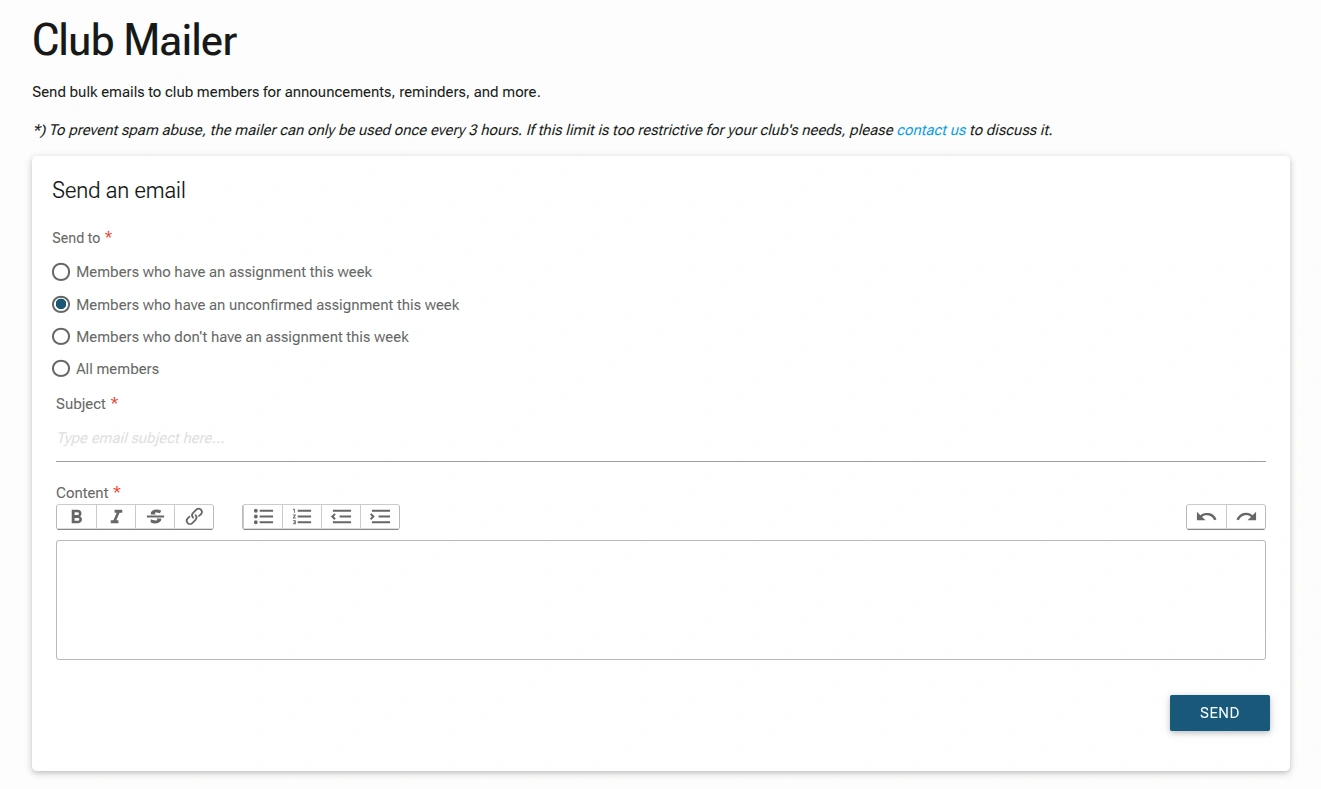
1. Composing Your Message
- Recipients:
- Members who have an assignment this week: Sends the email to all members who are currently assigned a role for the upcoming meeting.
- Members who have an unconfirmed assignment this week: Sends the email to members who have been assigned a role but have not yet confirmed it. This is the default selection.
- Members who don't have an assignment this week: Sends the email to members who are not scheduled for a role in the upcoming meeting.
- All members: Sends the email to every member in the club, regardless of their assignment status.By default, the mailer is set to reach all Active Members in your roster. This ensures no one is left out of important club news.
- Subject Line: Create a clear, engaging subject line.
- Message Body: Use the built-in editor to format your announcement. You can include meeting instructions, links to educational resources, or "Call for Volunteers" for upcoming special events.
2. Versatile Use Cases
Since the "boring" notifications (reminders to confirm roles) are already automated by the system, you can use the Bulk Mailer for more high-value communication:
- Meeting Recap/Minutes: Send a follow-up after the meeting to celebrate winners and share the Secretary's minutes.
- Special Event Blasts: Promote upcoming Open Houses, Speech Contests, or social gatherings.
- Officer Announcements: Share news regarding dues, executive meetings, or Toastmasters International updates.
The Collaboration Advantage
By granting the Toastmaster of the Week access to the Bulk Mailer, the VP-Edu is relieved of the "tedious task" of being the middleman for every meeting. The Toastmaster can take ownership of their meeting, sending out the theme or final encouragement to the role-holders directly.
Best Practices
- Be Specific with Recipients: Use the targeting options to send relevant messages to the right people.
- Keep Subjects Clear: A good subject line increases the likelihood that your email will be opened and read.
- Proofread Your Message: Use the rich text editor to format your message for clarity and professionalism.
- Use the Bulk Mailer for "Human" connection. Let the system handle the "Robot" work (reminders and status updates), while you use the Mailer to build club culture, recognize achievements, and keep the momentum high between meetings.
- Respect the Limit: Plan your communications around the 3-hour limit to avoid frustration. If you need to send multiple messages, space them out accordingly.