Club Administrator Role
The Club Administrator setting page allows you to manage which members of your club have full administrative access to the TMClubSchedule platform. This includes permissions to manage schedules, members, settings, and other critical club functions.
Club Administrator Management
While the VP-Education (VP-Edu) typically manages the club schedule, you may want to grant administrative privileges to other officers (e.g., the Secretary or President) to help with roster management or agenda updates.
1. Accessing Administrator Settings
From the main dashboard, navigate to Club Settings > Club Administrator or from the Club Administrator icon on the Dashboard Quick Access widget.
The Club Administrator page is split into two panels:
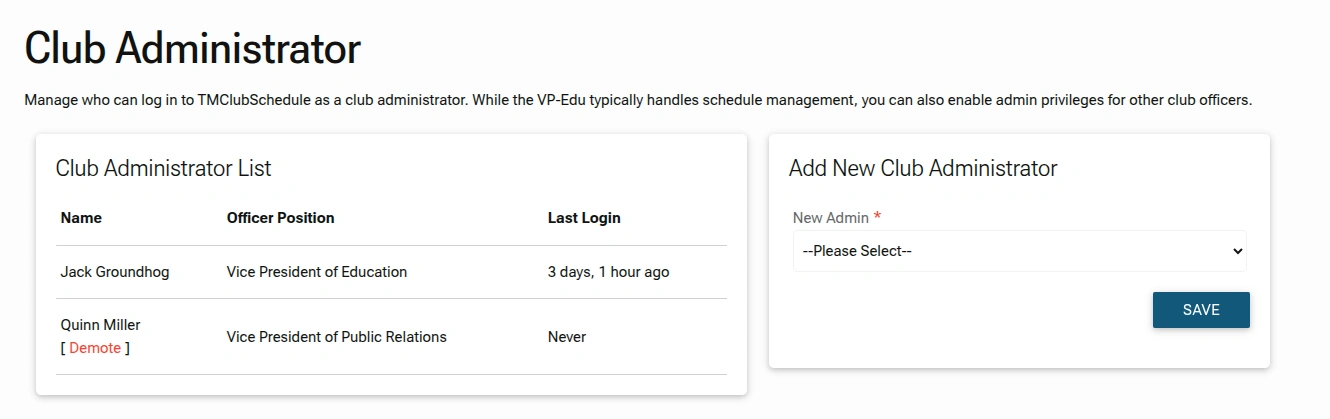
- Club Administrator List: Overview of members with elevated permissions
- Add New Club Administrator: Select club members to grant administrator permissions
2. Reviewing the Administrator List
The Club Administrator List panel provides an overview of everyone with elevated permissions:
- Name & Position: Displays the name and specific officer role of each admin.
- Last Login: Shows how recently each administrator accessed the system.
3. Adding a New Administrator
Prerequisite
Before assigning a new administrator, ensure they have been added to your Club Members list. If they aren't in the dropdown, you'll need to add them there first.
Please refer to the Adding a New Member section for instructions on how to add new members.
To grant admin rights to an officer:
- Locate the
Add New Club Administratorpanel. - Click the
New Admindropdown menu. - Select the member you wish to promote from the list.
- Click
SAVE.
4. Removing Administrative Privileges
If an officer no longer requires administrative access, you can revoke their permissions:
- Locate the officer in the
Club Administrator List. - Click the red
[ Demote ]link under their name.
Key Rules & Best Practices
- Limited Admins: It is recommended to assign administrator privileges only to trusted officers (e.g., Club President, Secretary, Treasurer) to maintain security and prevent accidental changes.
- Audit Trail: The
Last Logincolumn helps you monitor activity and identify inactive administrators who may no longer need access. - Demotion Process: Use the
[ Demote ]link to revoke admin rights from any non-VP-Edu officer when they leave their role or are no longer needed for administrative tasks.
VP-Education Protection:
The Vice President of Education is automatically granted administrator status and cannot be removed from it. This ensures continuity in managing the club's educational program and meeting schedule.
By carefully managing your Club Administrators, you ensure that the right people have the power to run your club efficiently while maintaining control and security over your club's data and operations.